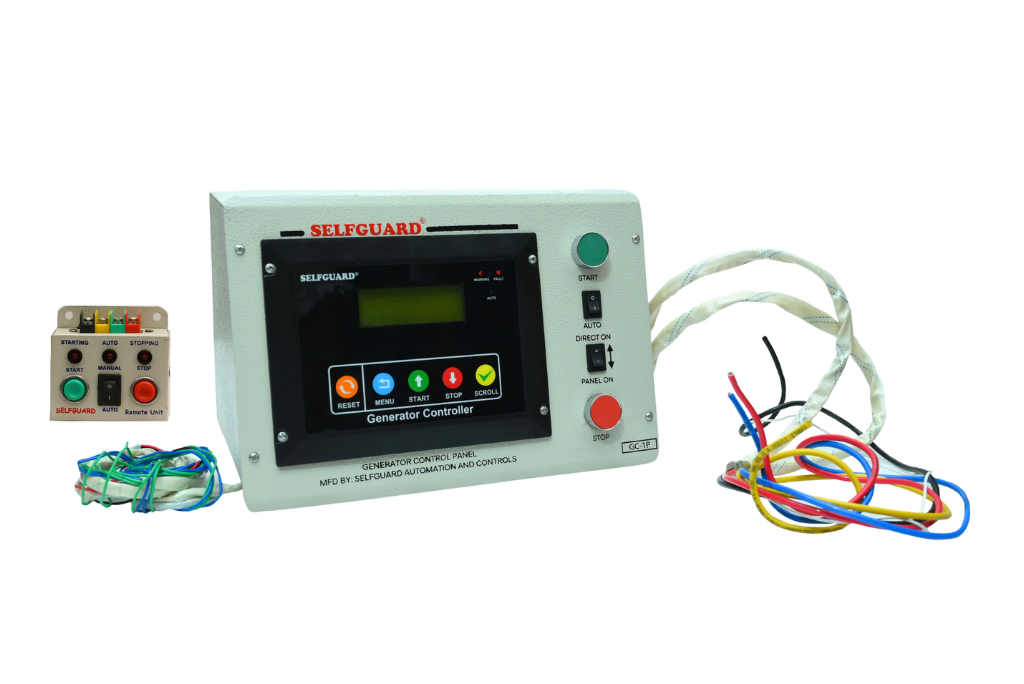
A generator provides backup power during electricity failures, but managing it manually can be inconvenient and inefficient. A generator control panel with auto start and auto stop functionality ensures that the generator operates automatically based on power availability. These systems are designed to provide reliable backup by controlling, monitoring, and protecting the generator without the need for constant manual intervention.
Automatic Start and Stop Functionality
A key feature of a generator control panel is its ability to automatically start and stop the generator. The system continuously monitors the main power supply. When a power failure occurs, it detects the interruption and starts the generator automatically. Once the main power supply is restored, the control panel stops the generator.
This automatic operation ensures that backup power is available whenever required without manual effort.
Remote Control Options
Generator control panels are available with both wired and wireless remote control options.
- Wired remote control allows operation through a connected cable.
- Wireless remote control allows users to operate the generator from a distance, with a range of up to approximately 300 feet.
Using the remote, users can start or stop the generator and switch between auto and manual modes.
Monitoring and Protection Features
Generator control panels are designed to monitor both the engine and alternator. They include built-in protection systems that help detect faults and ensure safe operation.
The system provides protection against:
- Low oil pressure
- Over voltage and under voltage
- Overcurrent conditions
- Battery-related issues
When a fault is detected, the system indicates the issue and can stop the generator to prevent damage.
Display and Real-Time Information
The control panels are equipped with a 20×4 LCD display that provides real-time information about the generator.
The display shows:
- Voltage
- Frequency
- RPM
- Fuel level
- Temperature
It also provides runtime details, service information, and fault indications, allowing users to monitor the generator’s performance.
Manual and Automatic Modes
In addition to automatic operation, generator control panels also support manual mode. Users can start or stop the generator using the control panel or remote control.
Even in manual mode, the system maintains functionality by stopping the generator when the main power supply returns.
Availability for Different Requirements
Generator control panels are available in both single-phase and three-phase configurations. This allows them to be used with different types of generators based on power requirements.
They are also available with both wired and wireless remote options, providing flexibility in installation and operation.
Conclusion
A generator control panel enhances the functionality of a generator by providing automatic operation, remote control, monitoring, and protection features. With auto start and auto stop capability, along with real-time display and safety systems, it ensures that the generator operates efficiently and reliably during power interruptions.